Showing posts with label C Plus. Show all posts

Wednesday, 12 November 2014

Lesson 10: Operators

An operator is a symbol that tells the compiler to perform specific mathematical or logical manipulations. C language is rich in built-in operators and provides the following types of operators:
  • Arithmetic Operators
  • Relational Operators
  • Logical Operators
  • Bitwise Operators
  • Assignment Operators
  • Misc Operators
This tutorial will explain the arithmetic, relational, logical, bitwise, assignment and other operators one by one.

Arithmetic Operators

Following table shows all the arithmetic operators supported by C language. Assume variable A holds 10 and variable B holds 20 then:
Show Examples
OPERATORDESCRIPTIONEXAMPLE
+Adds two operandsA + B will give 30
-Subtracts second operand from the firstA – B will give -10
*Multiplies both operandsA * B will give 200
/Divides numerator by de-numeratorB / A will give 2
%Modulus Operator and remainder of after an integer divisionB % A will give 0
++Increments operator increases integer value by oneA++ will give 11
Decrements operator decreases integer value by oneA– will give 9

Relational Operators

Following table shows all the relational operators supported by C language. Assume variable A holds 10 and variable B holds 20, then:
Show Examples
OPERATORDESCRIPTIONEXAMPLE
==Checks if the values of two operands are equal or not, if yes then condition becomes true.(A == B) is not true.
!=Checks if the values of two operands are equal or not, if values are not equal then condition becomes true.(A != B) is true.
>Checks if the value of left operand is greater than the value of right operand, if yes then condition becomes true.(A > B) is not true.
<Checks if the value of left operand is less than the value of right operand, if yes then condition becomes true.(A < B) is true.
>=Checks if the value of left operand is greater than or equal to the value of right operand, if yes then condition becomes true.(A >= B) is not true.
<=Checks if the value of left operand is less than or equal to the value of right operand, if yes then condition becomes true.(A <= B) is true.

Logical Operators

Following table shows all the logical operators supported by C language. Assume variable A holds 1 and variable B holds 0, then:
Show Examples
OPERATORDESCRIPTIONEXAMPLE
&&Called Logical AND operator. If both the operands are non-zero, then condition becomes true.(A && B) is false.
||Called Logical OR Operator. If any of the two operands is non-zero, then condition becomes true.(A || B) is true.
!Called Logical NOT Operator. Use to reverses the logical state of its operand. If a condition is true then Logical NOT operator will make false.!(A && B) is true.

Bitwise Operators

Bitwise operator works on bits and perform bit-by-bit operation. The truth tables for &, |, and ^ are as follows:
PQP & QP | QP ^ Q
00000
01011
11110
10011
Assume if A = 60; and B = 13; now in binary format they will be as follows:
A = 0011 1100
B = 0000 1101
—————–
A&B = 0000 1100
A|B = 0011 1101
A^B = 0011 0001
~A  = 1100 0011
The Bitwise operators supported by C language are listed in the following table. Assume variable A holds 60 and variable B holds 13, then:
Show Examples
OPERATORDESCRIPTIONEXAMPLE
&Binary AND Operator copies a bit to the result if it exists in both operands.(A & B) will give 12, which is 0000 1100
|Binary OR Operator copies a bit if it exists in either operand.(A | B) will give 61, which is 0011 1101
^Binary XOR Operator copies the bit if it is set in one operand but not both.(A ^ B) will give 49, which is 0011 0001
~Binary Ones Complement Operator is unary and has the effect of ‘flipping’ bits.(~A ) will give -61, which is 1100 0011 in 2’s complement form.
<<Binary Left Shift Operator. The left operands value is moved left by the number of bits specified by the right operand.A << 2 will give 240 which is 1111 0000
>>Binary Right Shift Operator. The left operands value is moved right by the number of bits specified by the right operand.A >> 2 will give 15 which is 0000 1111

Assignment Operators

There are following assignment operators supported by C language:
Show Examples
OPERATORDESCRIPTIONEXAMPLE
=Simple assignment operator, Assigns values from right side operands to left side operandC = A + B will assign value of A + B into C
+=Add AND assignment operator, It adds right operand to the left operand and assign the result to left operandC += A is equivalent to C = C + A
-=Subtract AND assignment operator, It subtracts right operand from the left operand and assign the result to left operandC -= A is equivalent to C = C – A
*=Multiply AND assignment operator, It multiplies right operand with the left operand and assign the result to left operandC *= A is equivalent to C = C * A
/=Divide AND assignment operator, It divides left operand with the right operand and assign the result to left operandC /= A is equivalent to C = C / A
%=Modulus AND assignment operator, It takes modulus using two operands and assign the result to left operandC %= A is equivalent to C = C % A
<<=Left shift AND assignment operatorC <<= 2 is same as C = C << 2
>>=Right shift AND assignment operatorC >>= 2 is same as C = C >> 2
&=Bitwise AND assignment operatorC &= 2 is same as C = C & 2
^=bitwise exclusive OR and assignment operatorC ^= 2 is same as C = C ^ 2
|=bitwise inclusive OR and assignment operatorC |= 2 is same as C = C | 2

Misc Operators ↦ sizeof & ternary

There are few other important operators including sizeof and ? : supported by C Language.
Show Examples
OPERATORDESCRIPTIONEXAMPLE
sizeof()Returns the size of an variable.sizeof(a), where a is integer, will return 4.
&Returns the address of an variable.&a; will give actual address of the variable.
*Pointer to a variable.*a; will pointer to a variable.
? :Conditional ExpressionIf Condition is true ? Then value X : Otherwise value Y

Operators Precedence in C

Operator precedence determines the grouping of terms in an expression. This affects how an expression is evaluated. Certain operators have higher precedence than others; for example, the multiplication operator has higher precedence than the addition operator.
For example x = 7 + 3 * 2; here, x is assigned 13, not 20 because operator * has higher precedence than +, so it first gets multiplied with 3*2 and then adds into 7.
Here, operators with the highest precedence appear at the top of the table, those with the lowest appear at the bottom. Within an expression, higher precedence operators will be evaluated first.
Show Examples
CATEGORYOPERATORASSOCIATIVITY
Postfix() [] -> . ++ – -Left to right
Unary+ – ! ~ ++ – – (type)* & sizeofRight to left
Multiplicative* / %Left to right
Additive+ -Left to right
Shift<< >>Left to right
Relational< <= > >=Left to right
Equality== !=Left to right
Bitwise AND&Left to right
Bitwise XOR^Left to right
Bitwise OR|Left to right
Logical AND&&Left to right
Logical OR||Left to right
Conditional?:Right to left
Assignment= += -= *= /= %=>>= <<= &= ^= |=Right to left
Comma,Left to right

Lesson 9: Scope Rules

A scope in any programming is a region of the program where a defined variable can have its existence and beyond that variable can not be accessed. There are three places where variables can be declared in C programming language:
  1. Inside a function or a block which is called local variables,
  2. Outside of all functions which is called global variables.
  3. In the definition of function parameters which is called formal parameters.
Let us explain what are local and global variables and formal parameters.

Local Variables

Variables that are declared inside a function or block are called local variables. They can be used only by statements that are inside that function or block of code. Local variables are not known to functions outside their own. Following is the example using local variables. Here all the variables a, b and c are local to main() function.
#include <stdio.h>
 
int main ()
{
  /* local variable declaration */
  int a, b;
  int c;
 
  /* actual initialization */
  a = 10;
  b = 20;
  c = a + b;
 
  printf ("value of a = %d, b = %d and c = %d\n", a, b, c);
 
  return 0;
}

Global Variables

Global variables are defined outside of a function, usually on top of the program. The global variables will hold their value throughout the lifetime of your program and they can be accessed inside any of the functions defined for the program.
A global variable can be accessed by any function. That is, a global variable is available for use throughout your entire program after its declaration. Following is the example using global and local variables:
#include <stdio.h>
 
/* global variable declaration */
int g;
 
int main ()
{
  /* local variable declaration */
  int a, b;
 
  /* actual initialization */
  a = 10;
  b = 20;
  g = a + b;
 
  printf ("value of a = %d, b = %d and g = %d\n", a, b, g);
 
  return 0;
}
A program can have same name for local and global variables but value of local variable inside a function will take preference. Following is an example:
#include <stdio.h>
 
/* global variable declaration */
int g = 20;
 
int main ()
{
  /* local variable declaration */
  int g = 10;
 
  printf ("value of g = %d\n",  g);
 
  return 0;
}
When the above code is compiled and executed, it produces the following result:
value of g = 10

Formal Parameters

Function parameters, formal parameters, are treated as local variables with-in that function and they will take preference over the global variables. Following is an example:
#include <stdio.h>
 
/* global variable declaration */
int a = 20;
 
int main ()
{
  /* local variable declaration in main function */
  int a = 10;
  int b = 20;
  int c = 0;

  printf ("value of a in main() = %d\n",  a);
  c = sum( a, b);
  printf ("value of c in main() = %d\n",  c);

  return 0;
}

/* function to add two integers */
int sum(int a, int b)
{
    printf ("value of a in sum() = %d\n",  a);
    printf ("value of b in sum() = %d\n",  b);

    return a + b;
}
When the above code is compiled and executed, it produces the following result:
value of a in main() = 10
value of a in sum() = 10
value of b in sum() = 20
value of c in main() = 30

Initializing Local and Global Variables

When a local variable is defined, it is not initialized by the system, you must initialize it yourself. Global variables are initialized automatically by the system when you define them as follows:
DATA TYPEINITIAL DEFAULT VALUE
int0
char
float0
double0
pointerNULL
It is a good programming practice to initialize variables properly otherwise, your program may produce unexpected results because uninitialized variables will take some garbage value already available at its memory location.

Lesson 8: Structures

C arrays allow you to define type of variables that can hold several data items of the same kind but structure is another user defined data type available in C programming, which allows you to combine data items of different kinds.
Structures are used to represent a record, Suppose you want to keep track of your books in a library. You might want to track the following attributes about each book:
  • Title
  • Author
  • Subject
  • Book ID

Defining a Structure

To define a structure, you must use the struct statement. The struct statement defines a new data type, with more than one member for your program. The format of the struct statement is this:
struct [structure tag]
{
   member definition;
   member definition;
   ...
   member definition;
} [one or more structure variables];
The structure tag is optional and each member definition is a normal variable definition, such as int i; or float f; or any other valid variable definition. At the end of the structure’s definition, before the final semicolon, you can specify one or more structure variables but it is optional. Here is the way you would declare the Book structure:
struct Books
{
   char  title[50];
   char  author[50];
   char  subject[100];
   int   book_id;
} book;

Accessing Structure Members

To access any member of a structure, we use the member access operator (.). The member access operator is coded as a period between the structure variable name and the structure member that we wish to access. You would usestruct keyword to define variables of structure type. Following is the example to explain usage of structure:
#include <stdio.h>
#include <string.h>
 
struct Books
{
   char  title[50];
   char  author[50];
   char  subject[100];
   int   book_id;
};
 
int main( )
{
   struct Books Book1;        /* Declare Book1 of type Book */
   struct Books Book2;        /* Declare Book2 of type Book */
 
   /* book 1 specification */
   strcpy( Book1.title, "C Programming");
   strcpy( Book1.author, "Nuha Ali"); 
   strcpy( Book1.subject, "C Programming Tutorial");
   Book1.book_id = 6495407;

   /* book 2 specification */
   strcpy( Book2.title, "Telecom Billing");
   strcpy( Book2.author, "Zara Ali");
   strcpy( Book2.subject, "Telecom Billing Tutorial");
   Book2.book_id = 6495700;
 
   /* print Book1 info */
   printf( "Book 1 title : %s\n", Book1.title);
   printf( "Book 1 author : %s\n", Book1.author);
   printf( "Book 1 subject : %s\n", Book1.subject);
   printf( "Book 1 book_id : %d\n", Book1.book_id);

   /* print Book2 info */
   printf( "Book 2 title : %s\n", Book2.title);
   printf( "Book 2 author : %s\n", Book2.author);
   printf( "Book 2 subject : %s\n", Book2.subject);
   printf( "Book 2 book_id : %d\n", Book2.book_id);

   return 0;
}
When the above code is compiled and executed, it produces the following result:
Book 1 title : C Programming
Book 1 author : Nuha Ali
Book 1 subject : C Programming Tutorial
Book 1 book_id : 6495407
Book 2 title : Telecom Billing
Book 2 author : Zara Ali
Book 2 subject : Telecom Billing Tutorial
Book 2 book_id : 6495700

Structures as Function Arguments

You can pass a structure as a function argument in very similar way as you pass any other variable or pointer. You would access structure variables in the similar way as you have accessed in the above example:
#include <stdio.h>
#include <string.h>
 
struct Books
{
   char  title[50];
   char  author[50];
   char  subject[100];
   int   book_id;
};

/* function declaration */
void printBook( struct Books book );
int main( )
{
   struct Books Book1;        /* Declare Book1 of type Book */
   struct Books Book2;        /* Declare Book2 of type Book */
 
   /* book 1 specification */
   strcpy( Book1.title, "C Programming");
   strcpy( Book1.author, "Nuha Ali"); 
   strcpy( Book1.subject, "C Programming Tutorial");
   Book1.book_id = 6495407;

   /* book 2 specification */
   strcpy( Book2.title, "Telecom Billing");
   strcpy( Book2.author, "Zara Ali");
   strcpy( Book2.subject, "Telecom Billing Tutorial");
   Book2.book_id = 6495700;
 
   /* print Book1 info */
   printBook( Book1 );

   /* Print Book2 info */
   printBook( Book2 );

   return 0;
}
void printBook( struct Books book )
{
   printf( "Book title : %s\n", book.title);
   printf( "Book author : %s\n", book.author);
   printf( "Book subject : %s\n", book.subject);
   printf( "Book book_id : %d\n", book.book_id);
}
When the above code is compiled and executed, it produces the following result:
Book title : C Programming
Book author : Nuha Ali
Book subject : C Programming Tutorial
Book book_id : 6495407
Book title : Telecom Billing
Book author : Zara Ali
Book subject : Telecom Billing Tutorial
Book book_id : 6495700

Pointers to Structures

You can define pointers to structures in very similar way as you define pointer to any other variable as follows:
struct Books *struct_pointer;
Now, you can store the address of a structure variable in the above defined pointer variable. To find the address of a structure variable, place the & operator before the structure’s name as follows:
struct_pointer = &Book1;
To access the members of a structure using a pointer to that structure, you must use the -> operator as follows:
struct_pointer->title;
Let us re-write above example using structure pointer, hope this will be easy for you to understand the concept:
#include <stdio.h>
#include <string.h>
 
struct Books
{
   char  title[50];
   char  author[50];
   char  subject[100];
   int   book_id;
};

/* function declaration */
void printBook( struct Books *book );
int main( )
{
   struct Books Book1;        /* Declare Book1 of type Book */
   struct Books Book2;        /* Declare Book2 of type Book */
 
   /* book 1 specification */
   strcpy( Book1.title, "C Programming");
   strcpy( Book1.author, "Nuha Ali"); 
   strcpy( Book1.subject, "C Programming Tutorial");
   Book1.book_id = 6495407;

   /* book 2 specification */
   strcpy( Book2.title, "Telecom Billing");
   strcpy( Book2.author, "Zara Ali");
   strcpy( Book2.subject, "Telecom Billing Tutorial");
   Book2.book_id = 6495700;
 
   /* print Book1 info by passing address of Book1 */
   printBook( &Book1 );

   /* print Book2 info by passing address of Book2 */
   printBook( &Book2 );

   return 0;
}
void printBook( struct Books *book )
{
   printf( "Book title : %s\n", book->title);
   printf( "Book author : %s\n", book->author);
   printf( "Book subject : %s\n", book->subject);
   printf( "Book book_id : %d\n", book->book_id);
}
When the above code is compiled and executed, it produces the following result:
Book title : C Programming
Book author : Nuha Ali
Book subject : C Programming Tutorial
Book book_id : 6495407
Book title : Telecom Billing
Book author : Zara Ali
Book subject : Telecom Billing Tutorial
Book book_id : 6495700

Bit Fields

Bit Fields allow the packing of data in a structure. This is especially useful when memory or data storage is at a premium. Typical examples:
  • Packing several objects into a machine word. e.g. 1 bit flags can be compacted.
  • Reading external file formats — non-standard file formats could be read in. E.g. 9 bit integers.
C allows us do this in a structure definition by putting :bit length after the variable. For example:
struct packed_struct {
  unsigned int f1:1;
  unsigned int f2:1;
  unsigned int f3:1;
  unsigned int f4:1;
  unsigned int type:4;
  unsigned int my_int:9;
} pack;
Here, the packed_struct contains 6 members: Four 1 bit flags f1..f3, a 4 bit type and a 9 bit my_int.
C automatically packs the above bit fields as compactly as possible, provided that the maximum length of the field is less than or equal to the integer word length of the computer. If this is not the case then some compilers may allow memory overlap for the fields whilst other would store the next field in the next word.

Lesson 7: Strings

The string in C programming language is actually a one-dimensional array of characters which is terminated by a null character ”. Thus a null-terminated string contains the characters that comprise the string followed by a null.
The following declaration and initialization create a string consisting of the word “Hello”. To hold the null character at the end of the array, the
size of the character array containing the string is one more than the number of characters in the word “Hello.”
char greeting[6] = {'H', 'e', 'l', 'l', 'o', ''};
If you follow the rule of array initialization then you can write the above statement as follows:
char greeting[] = "Hello";
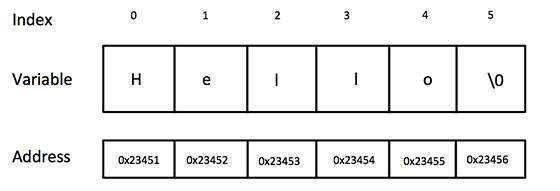
Following is the memory presentation of above defined string in C/C++:
String Presentation in C/C++
Actually, you do not place the null character at the end of a string constant. The C compiler automatically places the ” at the end of the string when it initializes the array. Let us try to print above mentioned string:
#include <stdio.h>

int main ()
{
   char greeting[6] = {'H', 'e', 'l', 'l', 'o', ''};

   printf("Greeting message: %s\n", greeting );

   return 0;
}
When the above code is compiled and executed, it produces result something as follows:
Greeting message: Hello
C supports a wide range of functions that manipulate null-terminated strings:
S.N.FUNCTION & PURPOSE
1strcpy(s1, s2);
Copies string s2 into string s1.
2strcat(s1, s2);
Concatenates string s2 onto the end of string s1.
3strlen(s1);
Returns the length of string s1.
4strcmp(s1, s2);
Returns 0 if s1 and s2 are the same; less than 0 if s1<s2; greater=”” than=”” 0=”” if=”” s1=””>s2.
5strchr(s1, ch);
Returns a pointer to the first occurrence of character ch in string s1.
6strstr(s1, s2);
Returns a pointer to the first occurrence of string s2 in string s1.
Following example makes use of few of the above-mentioned functions:
#include <stdio.h>
#include <string.h>

int main ()
{
   char str1[12] = "Hello";
   char str2[12] = "World";
   char str3[12];
   int  len ;

   /* copy str1 into str3 */
   strcpy(str3, str1);
   printf("strcpy( str3, str1) :  %s\n", str3 );

   /* concatenates str1 and str2 */
   strcat( str1, str2);
   printf("strcat( str1, str2):   %s\n", str1 );

   /* total lenghth of str1 after concatenation */
   len = strlen(str1);
   printf("strlen(str1) :  %d\n", len );

   return 0;
}
When the above code is compiled and executed, it produces result something as follows:
strcpy( str3, str1) :  Hello
strcat( str1, str2):   HelloWorld
strlen(str1) :  10

Lesson 5: Constants and Literals

The constants refer to fixed values that the program may not alter during its execution. These fixed values are also called literals.
Constants can be of any of the basic data types like an integer constant, a floating constant, a character constant, or a string literal. There are also enumeration constants as well.
The constants are treated just like regular variables except that their values cannot be modified after their definition.

Integer literals

An integer literal can be a decimal, octal, or hexadecimal constant. A prefix specifies the base or radix: 0x or 0X for hexadecimal, 0 for octal, and nothing for decimal.
An integer literal can also have a suffix that is a combination of U and L, for unsigned and long, respectively. The suffix can be uppercase or lowercase and can be in any order.
Here are some examples of integer literals:
212         /* Legal */
215u        /* Legal */
0xFeeL      /* Legal */
078         /* Illegal: 8 is not an octal digit */
032UU       /* Illegal: cannot repeat a suffix */
Following are other examples of various type of Integer literals:
85         /* decimal */
0213       /* octal */
0x4b       /* hexadecimal */
30         /* int */
30u        /* unsigned int */
30l        /* long */
30ul       /* unsigned long */

Floating-point literals

A floating-point literal has an integer part, a decimal point, a fractional part, and an exponent part. You can represent floating point literals either in decimal form or exponential form.
While representing using decimal form, you must include the decimal point, the exponent, or both and while representing using exponential form, you must include the integer part, the fractional part, or both. The signed exponent is introduced by e or E.
Here are some examples of floating-point literals:
3.14159       /* Legal */
314159E-5L    /* Legal */
510E          /* Illegal: incomplete exponent */
210f          /* Illegal: no decimal or exponent */
.e55          /* Illegal: missing integer or fraction */

Character constants

Character literals are enclosed in single quotes, e.g., ‘x’ and can be stored in a simple variable of chartype.
A character literal can be a plain character (e.g., ‘x’), an escape sequence (e.g., ‘\t’), or a universal character (e.g., ‘\u02C0′).
There are certain characters in C when they are preceded by a backslash they will have special meaning and they are used to represent like newline (\n) or tab (\t). Here, you have a list of some of such escape sequence codes:
ESCAPE SEQUENCEMEANING
\\\ character
\’‘ character
\”” character
\?? character
\aAlert or bell
\bBackspace
\fForm feed
\nNewline
\rCarriage return
\tHorizontal tab
\vVertical tab
\oooOctal number of one to three digits
\xhh . . .Hexadecimal number of one or more digits
Following is the example to show few escape sequence characters:
#include <stdio.h>

int main()
{
   printf("Hello\tWorld\n\n");

   return 0;
}
When the above code is compiled and executed, it produces the following result:
Hello   World

String literals

String literals or constants are enclosed in double quotes “”. A string contains characters that are similar to character literals: plain characters, escape sequences, and universal characters.
You can break a long line into multiple lines using string literals and separating them using whitespaces.
Here are some examples of string literals. All the three forms are identical strings.
"hello, dear"

"hello, \

dear"

"hello, " "d" "ear"

Defining Constants

There are two simple ways in C to define constants:
  1. Using #define preprocessor.
  2. Using const keyword.

The #define Preprocessor

Following is the form to use #define preprocessor to define a constant:
#define identifier value
Following example explains it in detail:
#include <stdio.h>

#define LENGTH 10   
#define WIDTH  5
#define NEWLINE '\n'

int main()
{

   int area;  
  
   area = LENGTH * WIDTH;
   printf("value of area : %d", area);
   printf("%c", NEWLINE);

   return 0;
}
When the above code is compiled and executed, it produces the following result:
value of area : 50

The const Keyword

You can use const prefix to declare constants with a specific type as follows:
const type variable = value;
Following example explains it in detail:
#include <stdio.h>

int main()
{
   const int  LENGTH = 10;
   const int  WIDTH  = 5;
   const char NEWLINE = '\n';
   int area;  
   
   area = LENGTH * WIDTH;
   printf("value of area : %d", area);
   printf("%c", NEWLINE);

   return 0;
}